
Appearance
Changelog
All notable changes to Bankroll Casino theme will be documented in this file.
Version 2.3.2
Added
- Native Content Editor - The standard WordPress editor is now available on every public post type (pages, posts, casinos, slots, news, payment methods, software providers, authors) alongside the block layout. Content lives in normal WordPress
post_content, so core search, SEO plugins, and standard workflows all work with it - and posts without editor content render exactly as before. See Native Content. - Native Content Position - New setting under Theme Settings → Layout → Blocks controls whether the editor content renders before or after the block layout.
- Block Shortcodes - Any block on the page can be placed inside the editor content with
[block key="…"]. An Insert block button next to Add Media opens a picker listing the page's blocks, and a placed block is automatically removed from the block area so it never renders twice. Each block now has an auto-generated Block Key (Block Settings → Block Data). - REST API Publishing - The public post types are now available via the WordPress REST API, so external tools can create and update content (title, editor content, status) with standard WordPress requests.
Improved
- Table of Contents - The TOC now combines editor-content H2 headings with block titles in true page order, including blocks placed inline via shortcode; editor headings automatically receive anchor links.
- Content Heading Sizes - H2–H6 headings inside Content blocks and native editor content are scaled up to match block title sizes (an in-content H2 now renders at the same size as an H2 block title), so mixed pages read with one consistent heading hierarchy. Existing content headings will appear larger after updating.
Version 2.3.1
Added
- Bonus Grid Filter by Casino - Bonus grids using Custom Setup can now filter by Casino, showing only the bonuses attached to a chosen casino.
- Bonuses Grid in Add Casino Blocks - The casino Add casino blocks button now includes a Bonuses Grid option that inserts a bonus grid pre-configured to show the current casino's bonuses (Style 2, ordered by newest).
- Mega Menu Style 2 - New Mega Menu Style setting (Theme Settings → Layout → Navigation) adds a column-based mega menu: menu items can show a description beneath their label, sub-items with their own third-level items expand inline, and the panel spans the full navigation width when column breaks are used (falling back to a compact dropdown when they aren't). See Navigation Menus.
Improved
- Countries Block - When a searched country is restricted for the current casino, the eligibility checker now suggests up to 4 top-rated casinos that accept that country, shown with logo and name below the result.
- Featured Bonus Selection - The Bonus Manager on casino posts can now feature a specific bonus even when several bonuses share the same type, instead of being limited to one bonus per type. The chosen bonus is the exact one shown in the casino hero.
- Demo Content - Seeded demo casinos now include a bonuses grid block. The demo import also creates 6 rating categories in the Casino Ratings taxonomy and scores every demo casino on them with notes, using custom rating categories instead of the fixed built-in rating fields.
Fixed
- Casino Hero Pros & Cons Alignment - Pros and cons list items in the casino hero are now always left-aligned instead of inheriting the hero text alignment on centered layouts.
- News & Page Date Sorting - Fixed news and page grids ordered by Created At (Latest)
- Global Order - Casinos without a global order number (or with it set to 0) no longer rank above casinos that have an explicit order - un-ordered casinos now always sort last.
- Payment Method Casino Count - Fixed payment methods showing "Available in 0 casinos" on new installs.
- Empty Toplist Warning - Fixed a PHP warning produced when a toplist block had no casinos added.
Version 2.3.0
Added
- Casino Blocks - Casino posts now have their own set of review blocks that pull data straight from the casino: Ratings (overall rating ring, editor verdict, and per-category rating cards), Payments (payment stats, payment methods, cryptocurrencies, withdrawal limits, and accepted currencies), Countries (allowed/restricted lists with an instant eligibility search), and Verdict (the author's opinion as an editorial pull-quote with attribution and review date).
- Add Casino Blocks Button - New button next to "+ New Block" on casino posts appends all casino blocks pre-configured - including a Pros & Cons block set to pull from the casino and a Software Providers grid for the current casino.
- Content Importer - New Import content button in the Blocks section turns a pasted document (Google Docs, Word, a web page, plain text, or Markdown) into Content blocks automatically: the content is split by H2 headings, with each H2 becoming a block title. Choose between appending to or replacing the existing blocks.
- Casino Rating Categories - New Rating Category taxonomy on casinos for adding custom rating categories beyond the built-in ones, displayed in the Casino Ratings block.
- Pros & Cons Style 2 - New Pros & Cons block made for casino templates.
- Casino Software Providers - Casinos can now have software providers attached (Details tab). Toplists can filter casinos by software provider, and Software Provider grids can filter by casino to output exactly the providers a casino offers.
- Per page Table of Contents - New Table of Contents control in Additional Settings on every post type: enable or disable the TOC for an individual post, overriding the global Layout setting in either direction.
- News Table of Contents - News articles now display the Table of Contents, following the same global and per-post settings as pages.
- Contact Form Shortcode - New
[contact_form]shortcode renders a Name/Email/Message contact form that emails submissions to a recipient set in Theme Settings; includes honeypot spam protection and fully translatable labels. Note: your site must be able to send email. Most hosts require an SMTP plugin or server mail configuration (see the shortcode docs for details). - Date Shortcode - New
[date]shortcode outputs the current year, month, day, or full date; works in block content and the content before/after fields. - Footer Menu Icons - Footer menu items can now display an icon before the label, the same way the main navigation menu does.
Improved
- Post Picker Field - Payment methods and software providers on casino posts now use a new picker field with search and a cleaner selected-items list.
- Demo Content - Seeded demo casinos now include the new casino review blocks.
Fixed
- TOC Anchors With Shortcodes - Block titles using shortcodes (e.g.
%currentyear%) now generate correct section anchors, so Table of Contents links match their sections instead of pointing to the raw shortcode text. - Grid Load More - Fixed a load more issue on Software Provider and Slot grids.
- Review Schema - Fixed invalid JSON-LD review schema.
Re-added
- Narrow Width Blocks - The Narrow Width toggle (removed in 2.2.2) is back: the Content, FAQ, and Pros & Cons blocks can be constrained to a narrower content width.
Version 2.2.2
Added
- Table of Contents - Pages now auto-generate a Table of Contents from H2 block titles, displayed above the content blocks with numbered links and a collapse/expand toggle. Enable it under Theme Settings → Layout Settings → Table of Contents, with an option to set it expanded or collapsed by default. Individual blocks can override their TOC label or be excluded entirely via the block Title Settings tab.
- Back to Top Button - A fixed back-to-top button can be enabled under Theme Settings → Layout Settings → Back to Top.
- Block Title Size - New Block Title Size setting under Theme Settings → Layout Settings → Block Settings lets you choose Small, Medium, or Large font size for block titles across all content blocks.
- Wager Requirement Full Field - New text field on bonus posts for specifying detailed wagering conditions, displayed in the toplist Wagering Details slot.
- Toplist New Slot Options - Three new slot options added: Daily Withdrawal Limit, Monthly Withdrawal Limit, and Wagering Details (extended wagering condition text).
- Block Background Color - Each content block now has a Design tab with a background color picker for per-block background control.
- Review Schema Toggle - New toggle under Theme Settings → General → Schema lets you enable or disable automatic JSON-LD review schema output on casino review pages.
- Cookie Notice - Updated design as a full-width bottom bar with a single Accept button and a close icon to dismiss.
Improved
- Toplist Slot UI - Updated UI across all toplist slots.
- Content Image Alignment - Images in WYSIWYG content blocks now respect WordPress alignment classes (center, left, right) and figure captions are styled consistently.
- Hero - Typography, spacing, and text size improvements default hero sections.
- Font Loading - Fonts are now bundled with the theme and served same-origin instead of loading from an external CDN, improving performance and removing the external dependency.
- Performance - Various performance improvements across the theme.
Removed
- Narrow Width Block Toggle - The per-block narrow width toggle has been removed from block settings.
- Core Page Style 3 - Removed from the Core Page Style selector; Style 1 and Style 2 remain.
Version 2.2.1
Added
- Casino Tag Taxonomy - New Casino Tag taxonomy available on casino posts (under the Taxonomies tab). Tags can be created directly from the casino edit screen and are used to group or label casinos for filtering in the Toplist block.
- Toplist Filter by Casino Tag - Toplists using Custom Setup can now filter casinos by Casino Tag. Select one or more tags and choose whether casinos must match any of the selected tags or all of them.
- Toplist Picker - The toplist selector in blocks has been replaced with a new Toplist Picker field. Each toplist in the list now shows its setup type (Manual or Custom), filter configuration, and order setting at a glance. Manual toplists display the selected casino names. A direct edit link opens the toplist post without leaving the page.
Changed
- Toplist Filters - Instant Payments and Crypto Casinos filter options have been deprecated from the Toplist block Custom Setup. Casino Tag filter replaces these with a more flexible tagging approach.
Version 2.2.0
Added
- Gallery Block - New Gallery block with two layout styles: a responsive grid (1–6 columns) and a featured image layout (first image displayed larger with remaining images in a grid). All images support a lightbox with keyboard navigation, captions, and image counter.
- Noindex / Nofollow Per Page - Individual pages and custom post types (casino, slot, news, etc.) can now be set to
noindex,nofollow, or both directly from the post edit screen. The robots meta tag is output automatically and is only active when no SEO plugin (Rank Math, Yoast, AIOSEO) is detected. - Cookie Notice Setting - Cookie notice can now be enabled from Theme Settings → General Settings → Show Cookie Notice without needing to configure Google Analytics or Tag Manager tracking IDs.
- Custom Author Slug - The URL slug for the Authors post type can now be customised from Theme Settings → General Settings → Post Slugs, allowing sites to use their own preferred URL structure (e.g.
/writers/instead of/authors/).
Improved
- Bonus Manager - Several improvements to the Bonus Manager field on casino posts: featured bonus can now be set directly from the manager; bonus visibility in the casino hero section can be toggled per bonus; bonuses can be reordered via drag and drop to control display order; the overall UI has been updated.
- UI Improvements - Improved layout and visual design for the Casino Reviews author template and Casino Hero Style 2, improving readability and appearance across desktop and mobile.
Version 2.1.5
Fixed
- Bonus Currency Fallback - If a bonus does not have a currency set, it now automatically uses the default currency configured on the linked casino instead of showing nothing.
- Bonus Currency Field - The currency field on a bonus can now be left blank, allowing the casino default currency to take over automatically.
- Bonus Error - Fixed a issue that could occur when bonus had no currency assigned.
Version 2.1.4
Added
- Casino Hero Style Selector - Two new casino hero layout styles added (Style 2, 3), selectable per site in Theme Settings → Layout Settings → Hero → Casino → Hero Style.
- Toplist Item Styles - Four new toplist item style variations added: Offer Row (bonus value boxes + rating), Detailed Card (sidebar with payment info, pros, and payment methods), Compact Row (single-line minimal layout), and Expandable Bonuses (default bonus in main row with a toggle to reveal all other available casino bonuses).
- Casino Grid Sort Options - Two new sort options added to the Casino Grid block: Global Rating (Highest) and Global Order, allowing casinos to be ordered by their rating score or global ranking position.
Improved
- Images Above the Fold - Lazy loading removed from images in hero sections and navigation to improve Largest Contentful Paint (LCP) and overall page performance.
Fixed
- Bonus Attachment - Fixed an issue where newly created bonuses were not attached to casinos.
Version 2.1.3
Added
- Bonus Manager - New Bonus Manager field on casino posts displays all attached bonuses in a structured table, showing bonus name, type, bonus text, active status, and expiry date for easier bonus management. Bonuses are automatically linked to a casino on creation.
- Bonus Disabled Field - Bonuses can now be individually disabled on the bonus post.
- Bonus Expiry Date Field - Bonuses can now have an expiry date set. A bonus is considered expired once the date has passed.
- Bonus Active State - Inactive bonuses are automatically reflected across all CTA buttons. The button becomes unclickable and the label changes to "Unavailable".
- Casino Link on Bonus Edit View - When editing a bonus post, a quick link to the linked casino edit page is shown directly below the post title for faster navigation.
Improved
- Bonus Admin List - Two new columns added to the bonus list in WordPress admin: Active (✓/✗) and Expires At. Rows for inactive or expired bonuses are highlighted in light red for quick identification. Bonuses can also be filtered by Active or Inactive status using the dropdown above the list.
Version 2.1.2
Added
- Affiliate Link Support for CTA Buttons - CTA buttons now automatically mark affiliate links as sponsored. This is applied across all CTA buttons in toplists, bonus grids, casino grids, casino hero sections, slot pages, and available bonuses.
Version 2.1.1
Added
- Simple Metas for Slot & Software Provider - Added simple meta fields to slot and software provider post types
- Footer Logo Option - Option to display a separate logo in the footer
- Global Background for Slot Post Type - Option to set a global background color for the slot post type
- New Theme Color Variation - New color variation option available in theme settings
Improved
- Hero Component Shadow - New color variables added for hero component shadow customization
- Accessible Name for Filter Button - Filter button now includes an accessible name for better screen reader support
Fixed
- Theme SEO Issue: Double Title Tag - Fixed duplicate title tag issue caused by built-in theme SEO output
- Search Overlay Issues - Fixed custom color variable issues with the search overlay component
Version 2.1.0
Added
- Child Theme Support - Override any block template, create entirely new block styles, or add custom fonts from a child theme without touching parent theme files. Your customizations stay after every theme update. See Customization Guide for details
- Analytics: GTM & GA4 - Add Google Tag Manager or Google Analytics 4 by simply pasting your tag ID (
GTM-XXXXXXXXorG-XXXXXXXXXX) in Theme Settings → General Settings → Analytics. Cookie consent and Google Consent Mode v2 are handled automatically - Hero Title Label - New optional label field displayed above the hero title. Useful for callouts like "New", "Top Rated", or "#1 Choice". Background and text colors configurable in Theme Settings → Colors → Hero
- New Color Variables - Four new configurable color variables available in Theme Settings → Colors: Hero Anchor, Content Anchor, Toplist Accent, and Toplist Accent Text
Version 2.0.0
Added
- Slots & Software Providers - New custom post types for slots and software providers. Slot pages support 3 different hero layouts with featured casino, featured bonuses, and iframe support
- Grid Block: Slots & Software Providers - Grid block now supports slots (4 styles) and software providers (3 styles)
- Grid Block: Filtering & Sorting - New filtering and sorting options for grid block.
- Grid Block: News Category Filter - News posts can now be assigned categories and filtered by category in the Grid block
- Block Global Settings - Option to center titles, add separators, add custom anchor for core page interlinking. Option to set FAQ, Content, and Pros & Cons blocks to narrow width
- Theme Settings: Slugs & Archives - Custom slug and archive page configuration for slots and software providers
Improved
- Grid Block Filters - General UI/UX improvements for filter dropdowns and interactions
- Demo Import - Improved demo import for quick base setup that can be built upon
Version 1.0.8
Added
- Title Tag Support - Added support for custom SEO plugins to control title tags
Version 1.0.7
Improved
- Mega Menu Layout - Changed mega menu layout to column layout for better organization
- Content Module Spacing - Improved spacing and title text font size adjustments for enhanced visual appearance
- Translation System - Added month strings to translations for better translation support
Version 1.0.6
Added
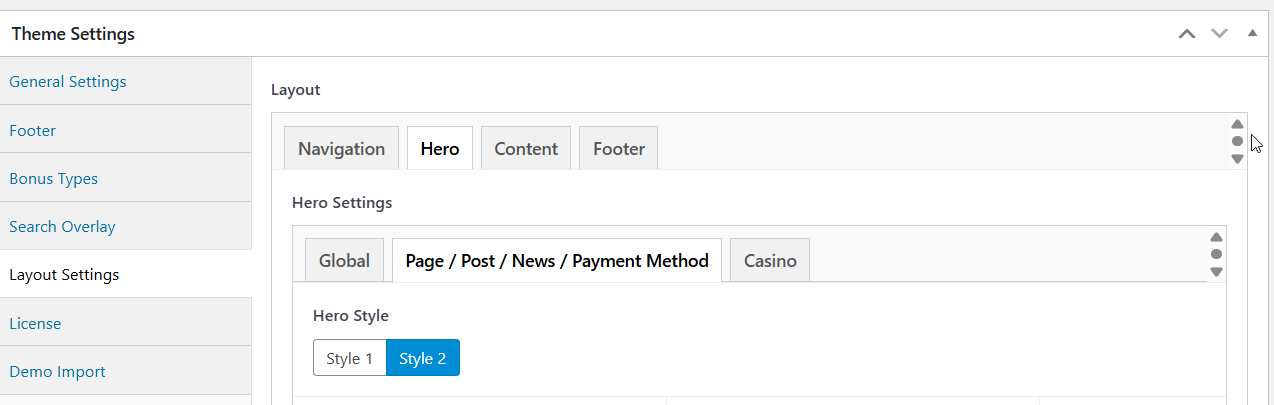
- Hero Template Style 2 - New alternative boxed hero layout for pages/posts/news/payment methods. Available in Theme Settings -> Layout Settings -> Page/Post/News/Payment Method -> Hero Style
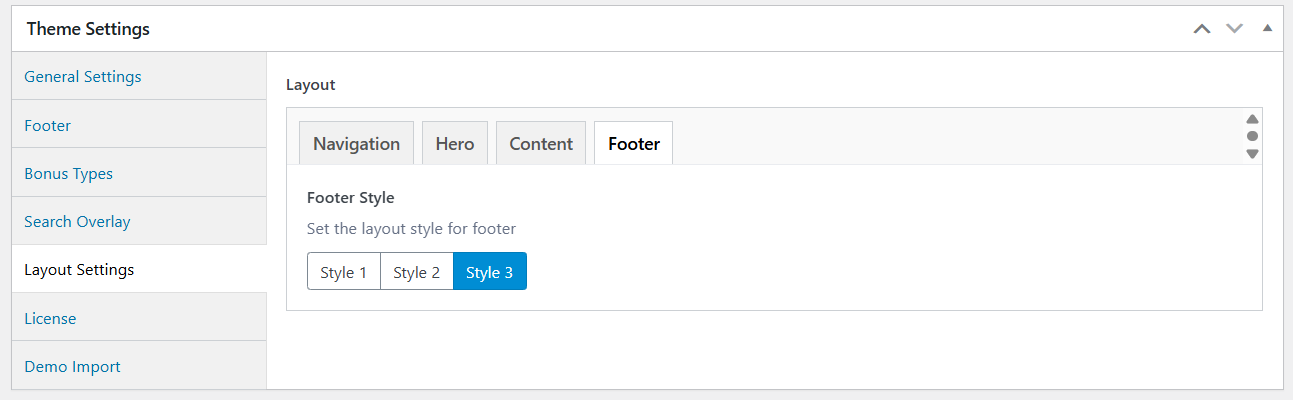
- Footer Template Style 3 - New footer layout option, that will display only 1 menu slot (First Footer Menu). Theme Settings -> Layout Settings -> Footer.
- Core Page Style 3 - New simple core pages style, without background. Available in Theme Settings -> Layout Settings -> Hero -> Page/Post/News/Payment Method -> Core Page Style
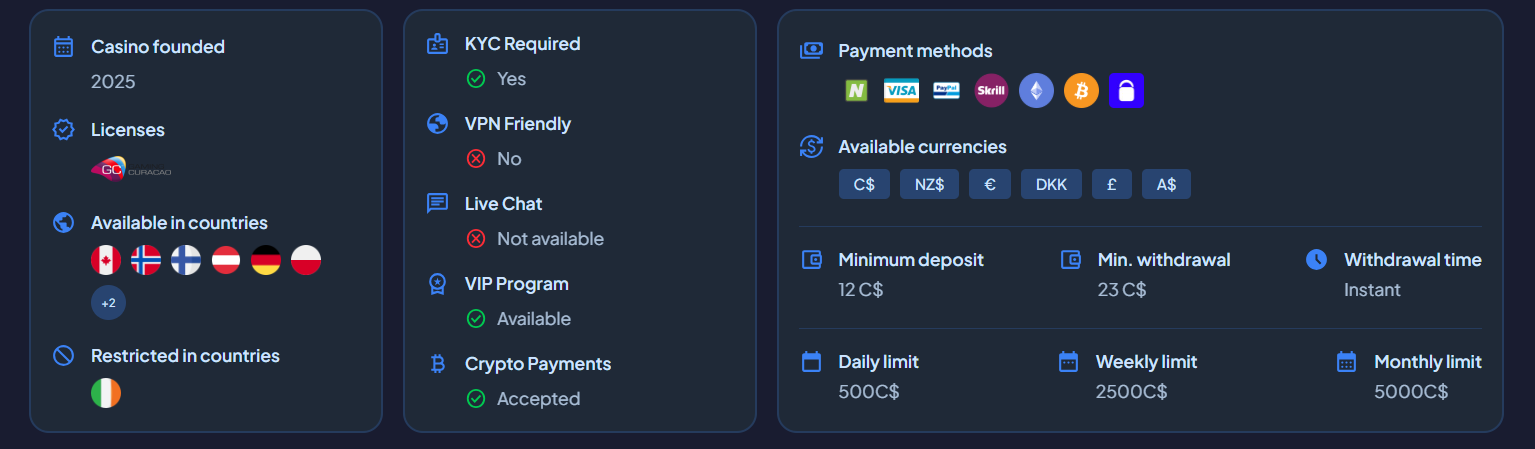
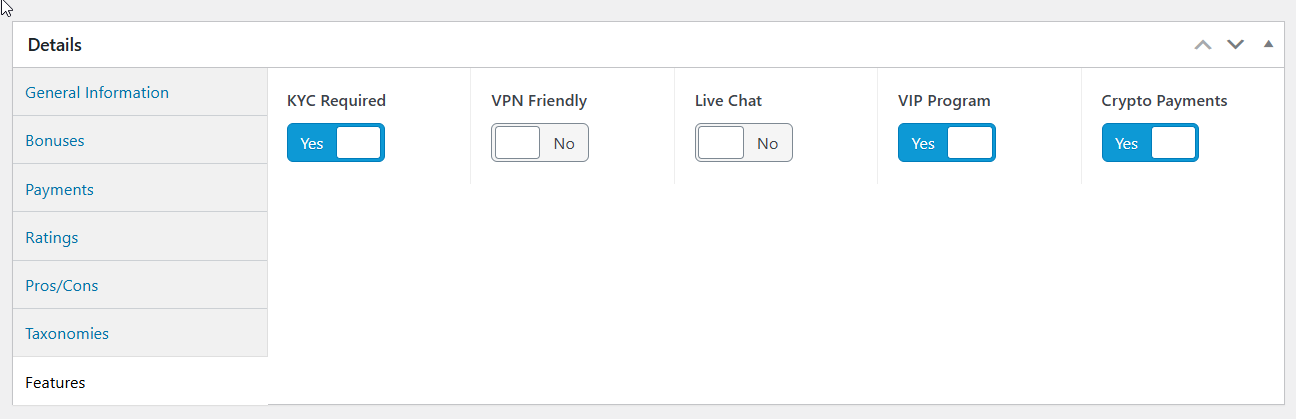
- Casino Features Display - New casino features component showcasing KYC requirements, VPN friendly status, live chat availability, VIP program, and crypto payment support. Can be enabled/disabled in Theme Settings -> Layout Settings -> Hero -> Casino -> Show Casino Features
- Email Support in Socials - Author and site social links now support email addresses with mailto: protocol
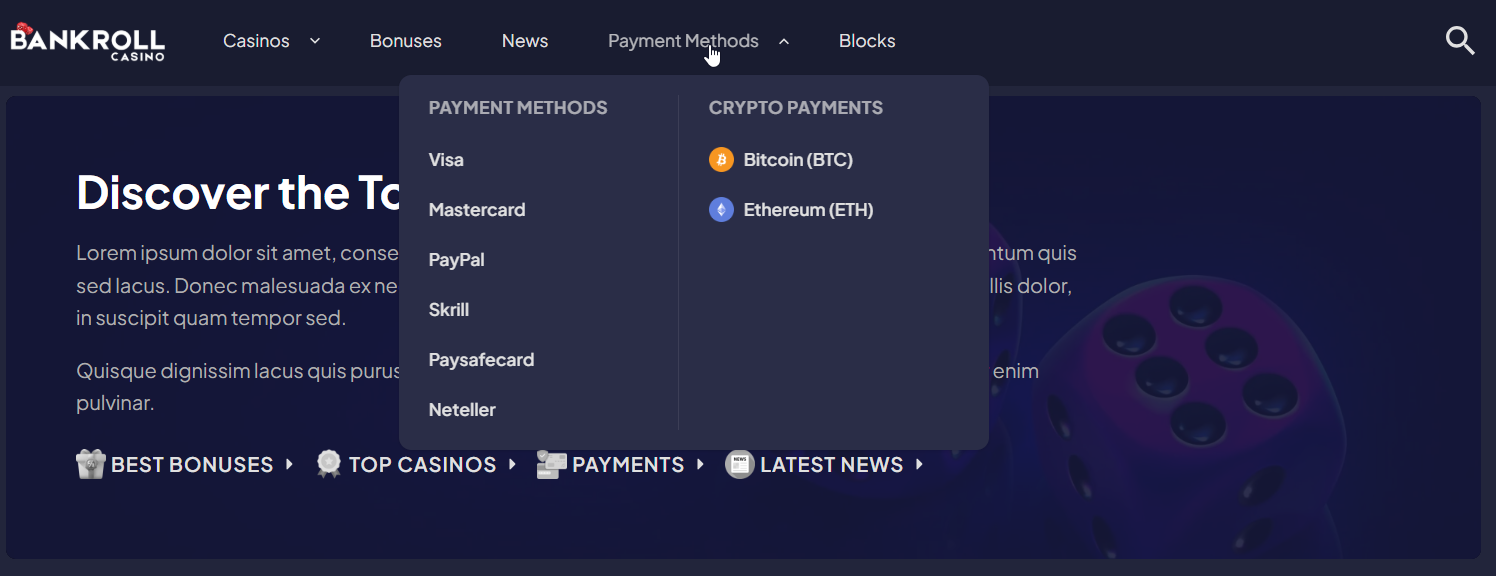
- Mega Menu - Added column breaks, column titles, and icon support for better menu organization
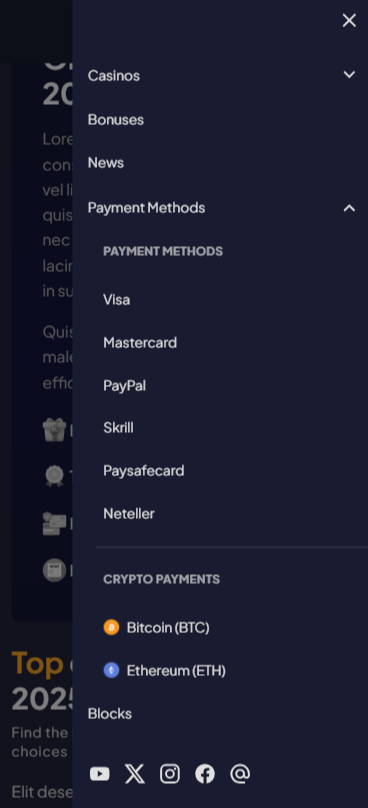
- Mobile Menu Column Support - Column breaks and titles now available in mobile navigation menu
Improved
- Available Bonuses Modal - Tweaked layout with responsive grid (2 columns mobile, 3 columns desktop) and prominent display of bonus offer and promo code
- Navigation Spacing - Adjusted padding based on theme navigation settings for better consistency
- Translation System - Added 11 new translatable strings for casino features (KYC, VPN, Live Chat, VIP, Crypto, and status indicators)
Fixed
- Available Bonuses Modal - Fixed automatic scroll-to-top issue when opening modal window
- Terms & Conditions Display - Bonus modal now correctly checks if T&C is enabled before displaying
Version 1.0.5
Improved
- Theme Color Settings - Adjusted color variables for improved component styling and consistency
Fixed
- Sticky Navigation - Fixed sticky menu not working when transparent navigation is disabled
Version 1.0.4
Added
- Dark Color Theme - New dark theme option in theme settings
Improved
- Optimized Demo Data - Reduced seeded data amount
- Blocks Section Spacing - Improved spacing and layout consistency for all block types
Fixed
- Restricted Countries Display - Fixed restricted countries not displaying correctly on casino pages
- Search Results - Fixed search results not showing properly
Version 1.0.3
Added
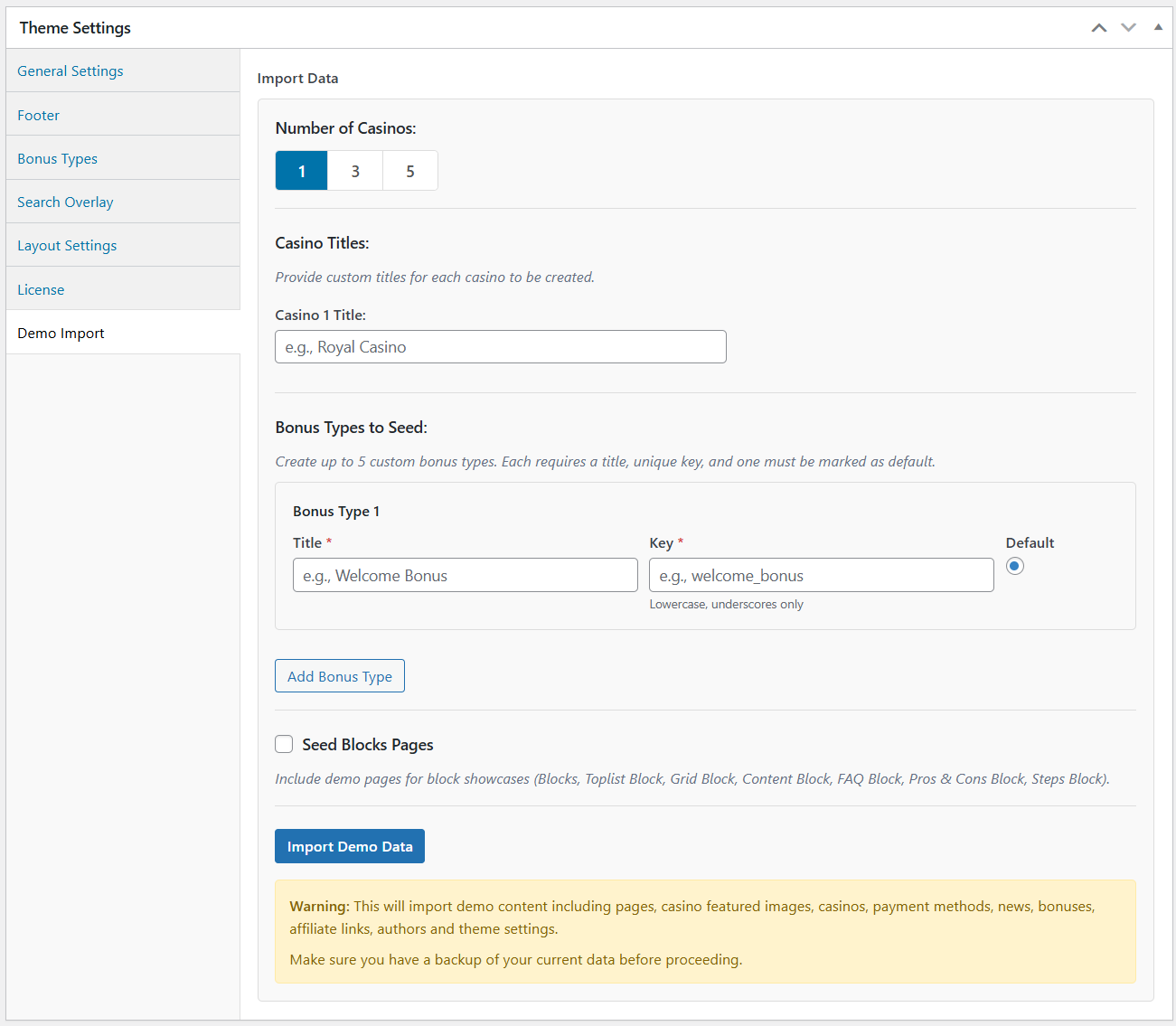
- Demo Import: Casino Title Customization - Specify custom casino names instead of auto-generated titles
- Demo Import: Custom Bonus Types - Create up to 5 custom bonus types with unique keys and titles during demo import. No need to rename or recreate bonus types and reassign bonuses afterwards like the previous method required.
- Demo Import: Blocks Pages Toggle - Optional checkbox to seed blocks showcase pages
Improved
- Mobile Navigation - Fixed clunky menu opening animation and eliminated scroll jumping on sticky navigation
- Mobile Navigation - Fixed missing hamburger menu on medium screens (md breakpoint)
- Hover Element - Fixed overflow issues when displaying many items
- Casino Template - Improved spacing and layout consistency throughout
- Casino Template - Payment Methods section now displays more methods initially
Version 1.0.2
Added
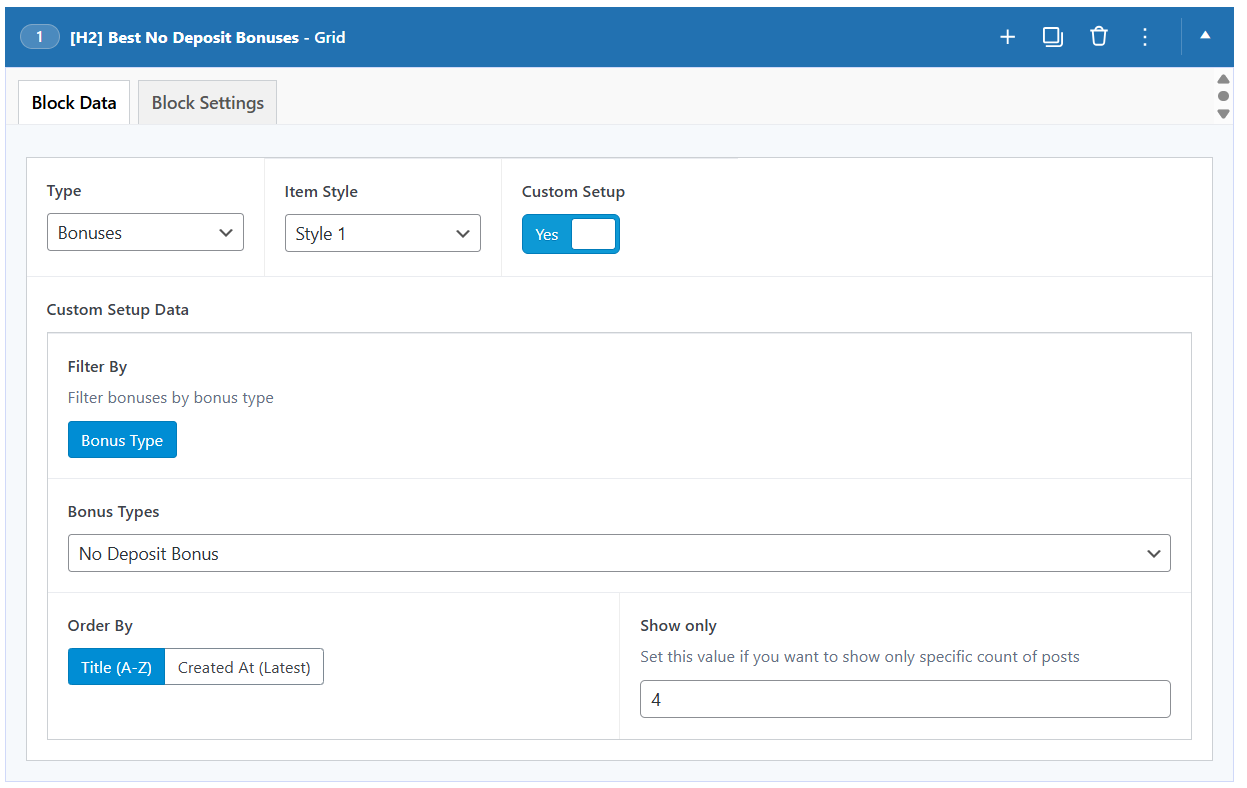
- Grid bonus filtering by bonus type for more targeted bonus displays
Improved
- Increased max core page count to 8 core pages for expanded content options
Fixed
- Fixed hero accent, hero accent text, hero accent highlight color variables that were not resolved correctly.
Version 1.0.1
Added
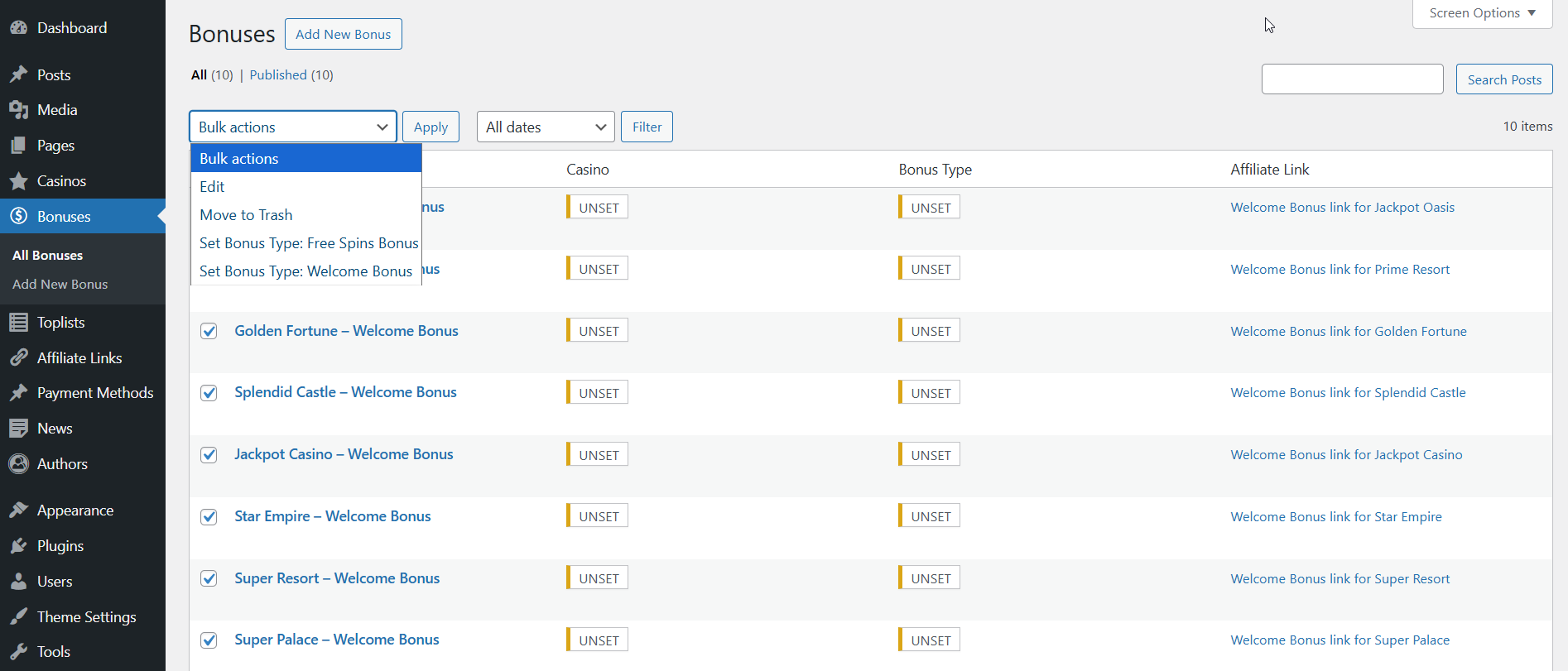
Bulk Actions for Bonuses: New bulk actions functionality in WordPress admin that lets you set bonus types for multiple bonuses at once via bulk actions dropdown
Dynamically generated bulk action options based on configured bonus types in theme settings
Improved
- Added null checks to prevent errors when bonus types are not configured in theme options
- Clear "UNSET" labels displayed for missing required fields
- Toplist Rendering - Fixed potential null reference errors when bonus type is empty
Version 1.0.0
Initial Release
The first public release of Bankroll Casino - a premium WordPress theme built for casino and gambling affiliate websites.
Features
- Powerful Toplist Builder - Create reusable casino rankings with manual or automatic filtering
- Modular Block System - 6 flexible content blocks for custom page building
- Lightning-Fast Performance - Optimized queries, lazy loading, and minimal dependencies
- Built-in SEO and Schemas - FAQ, Reviews and Breadcrumb structured data for better rankings
- Complete Translation Control - Built-in translation panel to customize every string
- Custom Color System - Full color control with visual pickers
- Responsive Design - Mobile-first approach ensuring perfect display on all devices
Included
- Comprehensive documentation
- Regular updates and support
- One-click demo import