
Appearance
General Settings
Overview
The General Settings section in Theme Settings contains core configuration options for your theme including logo, fonts, social links, custom slugs, archive pages, analytics, and other essential settings.
Access: Theme Settings → General Settings Tab
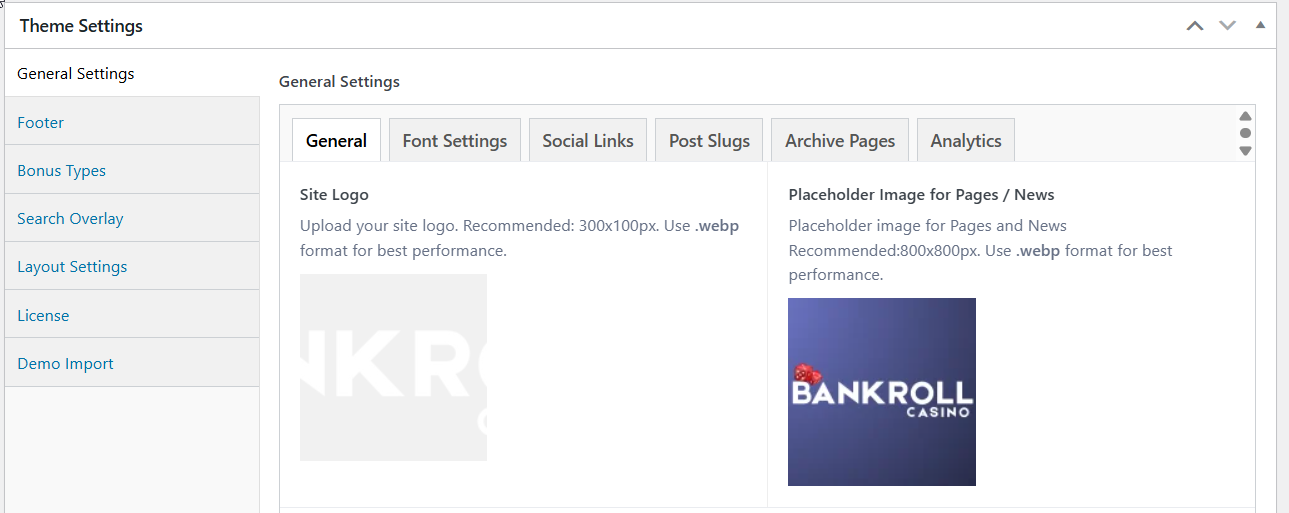
Settings Sections
The General Settings are organized into multiple tabs for easy navigation:
- General
- Font Settings
- Social Links
- Post Slugs
- Archive Pages
- Analytics
1. General Tab
Site Logo
Purpose: Upload your site logo displayed in the navigation bar
Recommendations:
- Size: 300×100px (adjust based on your design)
- Format: WEBP for best performance (PNG, JPG also supported)
- File Size: Keep under 100KB for fast loading
- Background: Transparent background (PNG/WEBP) works best
- Retina: Upload 2x size for high-DPI displays
Where It Appears:
- Navigation header (desktop and mobile)
- In footer
Affiliate Disclosure Text
Purpose: Add required affiliate disclosure text to inform users about sponsored content
Compliance: Important for FTC compliance and transparency
Where It Displays:
- Automatically on casino review pages
- Optionally in toplist blocks (enable in block settings)
- Optionally in grid blocks (enable in block settings)
Affiliate Link Prefix
Default: visit
Purpose: Customize the URL prefix for pretty affiliate links
URL Format: yoursite.com/[prefix]/casino_shortcode/bonus_type
Important Notes:
- After changing: Flush permalinks by visiting Settings → Permalinks → Save Changes
- Don't use: Existing page slugs (will cause conflicts)
- Keep simple: One word, lowercase, no special characters
404 Page Toplist
Purpose: Select a toplist to display on 404 error pages
2. Font Settings Tab
Heading Font
Purpose: Choose font family for all headings (H1, H2, H3, H4, H5, H6)
Options:
Web Safe Fonts (Faster loading):
- Arial
- Verdana
- Tahoma
Bunny Fonts (Privacy-friendly Google Fonts alternative):
- DM Sans, Lato, Open Sans, Roboto, Montserrat, Poppins, Inter
- Source Sans Pro, Nunito, Raleway, Be Vietnam Pro, Plus Jakarta Sans
- Bebas Neue, Advent Pro, Albert Sans, Aleo, Archivo, Asap, Chivo, Mohave
Default: Arial
Performance Note: Web safe fonts load faster because they're already on users' devices. Bunny Fonts are loaded from a privacy-friendly CDN (Google Fonts alternative compliant with GDPR).
Content Font
Purpose: Choose font family for body text, paragraphs, and general content
Options: Same as Heading Font (listed above)
3. Social Links Tab
Site Socials
Purpose: Add social media profile links displayed in site footer and mobile navigation
Fields Per Row:
- Platform (Select dropdown)
- URL (URL field)
Supported Platforms:
- YouTube
- TikTok
- Telegram
- Snapchat
- Vimeo
How to Add:
- Click "Add Row"
- Select platform from dropdown
- Enter full URL (e.g.,
https://facebook.com/yourpage) - Repeat for additional profiles
- Drag rows to reorder
Display Locations:
- Footer (icons with links)
- Mobile navigation menu
4. Post Slugs Tab
Customize the URL slug for each custom post type. The slug forms the first segment of every URL for that post type.
| Post Type | Default Slug | Example URL |
|---|---|---|
| Casino | casino | yoursite.com/casino/betsson |
| News | news | yoursite.com/news/article-title |
| Payment Method | payment-method | yoursite.com/payment-method/bitcoin |
| Slot | slot | yoursite.com/slot/starburst |
| Software Provider | software-provider | yoursite.com/software-provider/netent |
After changing any slug: go to Settings → Permalinks → Save Changes to flush rewrite rules.
Avoid conflicts: don't use existing page slugs or WordPress reserved terms (admin, login, page, etc.).
5. Archive Pages Tab
Assign a page to act as the archive for each custom post type. The selected page appears as the parent segment in breadcrumb navigation - using the page title, or the Custom Breadcrumb field from the page's Additional Settings if set.
| Post Type | Breadcrumb Example |
|---|---|
| Casino | Home → Casinos → Betsson Casino |
| Payment Method | Home → Payment Methods → Bitcoin |
| News | Home → News → Article Title |
| Slot | Home → Slots → Starburst |
| Software Provider | Home → Software Providers → NetEnt |
6. Analytics
Two analytics options are available. Enter only one - if both are filled in, GTM takes priority and GA4 is skipped.
Google Tag Manager (GTM)
Format: GTM-XXXXXXXXXX
Loads the GTM container script in <head> and the GTM <noscript> fallback immediately after <body>. Use this if you manage tags (GA4, ad pixels, etc.) through GTM.
Google Analytics 4 (GA4)
Format: G-XXXXXXXXXX
Loads the GA4 gtag.js script directly in <head>. Use this for a simple GA4 setup without Tag Manager.
Cookie Consent
Setting either GTM or GA4 enables the cookie consent notice. Analytics scripts are loaded with Google Consent Mode v2 - tracking only activates after the user accepts cookies.