
Appearance
Toplist Documentation
Overview
Toplists are customizable lists of casinos that can be displayed on your site. They support both manual casino selection and automatic filtering based on various criteria. Toplists can be inserted into pages using the Toplist block.
Creating a Toplist
To create a new toplist, navigate to Toplists → Add New in your WordPress admin panel.
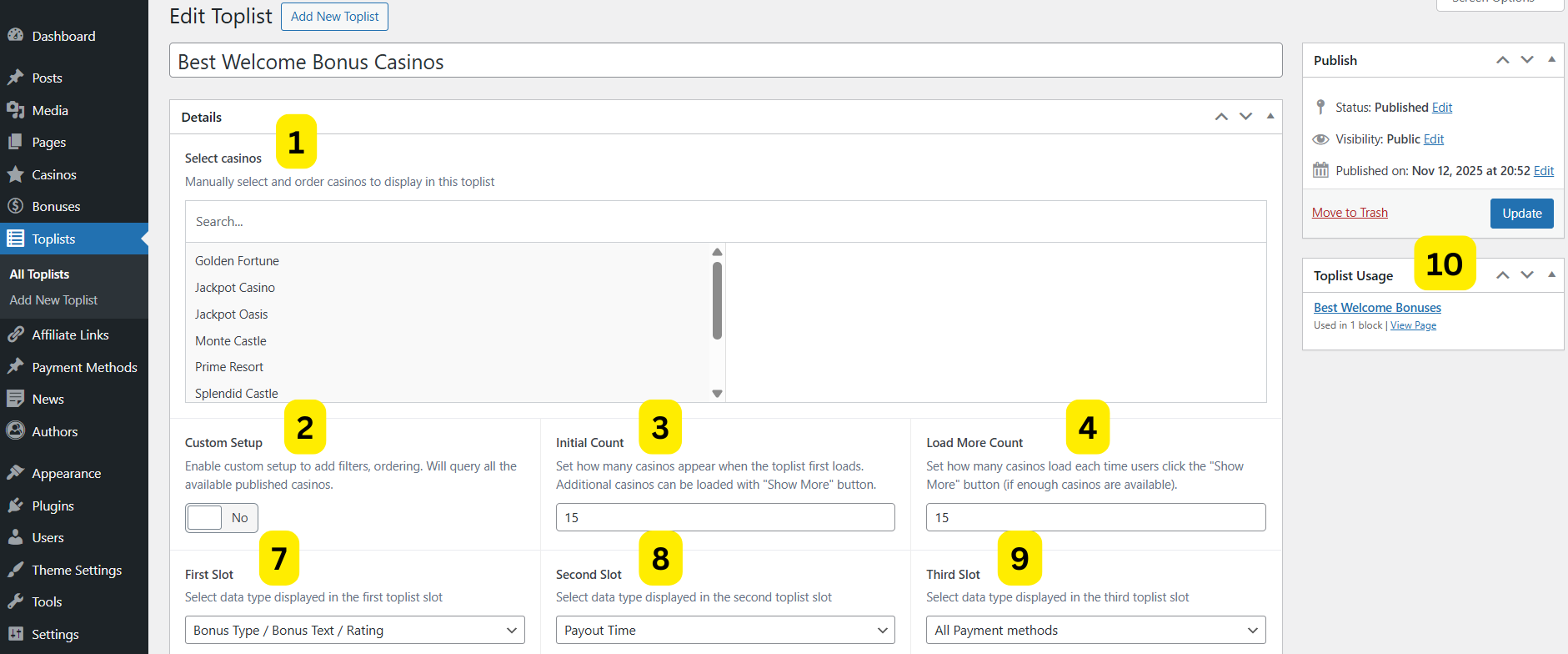
or create custom toplist
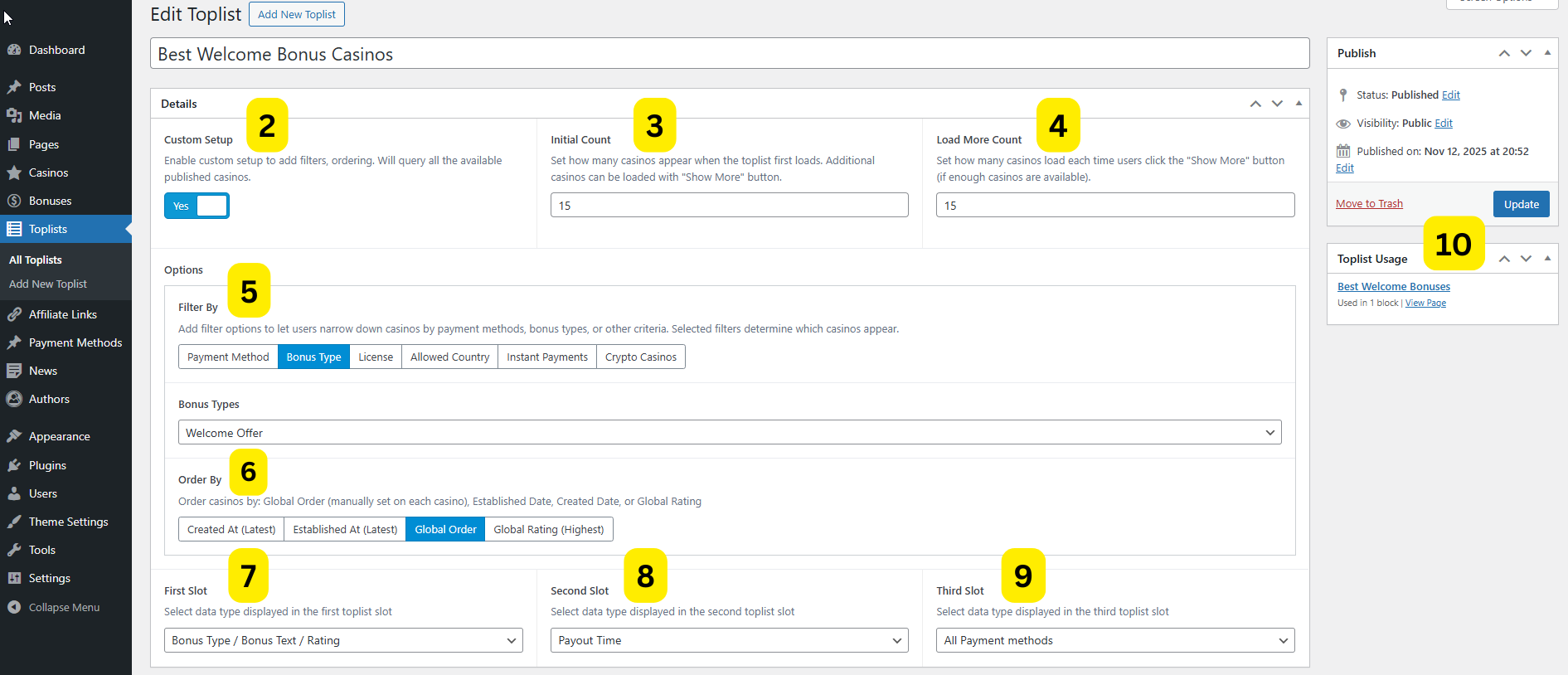
Toplist Fields
1.Select Casinos
- Description: Manually select and order casinos to display in this toplist
- Visibility: Only visible when "Custom Setup" is disabled
- Usage: Drag and drop casinos to reorder them. The order you set here is the order they will appear in the toplist.
2.Custom Setup
- Description: Enable custom setup to add filters and ordering. Will query all available published casinos.
- When Enabled:
- The manual "Select Casinos" field is hidden
- Custom filter and ordering options become available
- Casinos are automatically retrieved based on your filter criteria
3.Initial Count
- Description: Set how many casinos appear when the toplist first loads
- Note: Additional casinos can be loaded with the "Show More" button if more casinos are available
4.Load More Count
- Description: Set how many casinos load each time users click the "Show More" button
- Note: The "Show More" button only appears if there are more casinos than the initial count
Custom Setup Options
These options are only available when Custom Setup is enabled.
5.Filter By
- Description: Add filter options to let users narrow down casinos by payment methods, bonus types, or other criteria
- Options:
- Payment Method - Filter casinos that accept a specific payment method
- Bonus Type - Filter casinos that offer a specific bonus type
- License - Filter casinos by gambling license
- Allowed Country - Filter casinos available in a specific country
- Casino Tag - Filter casinos by one or more casino tags
- Software Provider - Filter casinos that offer games from a specific software provider
- None - Show all casinos (default behavior)
Bonus Types
- Description: Select which bonus type to filter by
- Available Options: Configured in Theme Settings → Bonus Types
Payment Methods
- Description: Select which payment method to filter by
- Available Options: All published payment method posts
Licenses
- Description: Select which license to filter by
- Available Options: All casino licenses in your casino taxonomies
Allowed Countries
- Visibility: Only when Filter By = "Allowed Country"
- Description: Select which country to filter by
- Available Options: All countries in your casino taxonomies
Casino Tags
- Visibility: Only when Filter By = "Casino Tag"
- Description: Select one or more casino tags to filter by
- Tag Match Mode:
- Any of (default) - Casinos matching at least one of the selected tags are included
- All of - Only casinos matching every selected tag are included
- Available Options: All casino tags created under Toplists → Casino Tags or directly from the casino edit screen
Software Providers
- Visibility: Only when Filter By = "Software Provider"
- Description: Select which software provider to filter by; casinos with that provider attached (casino Details → Software Providers) are included
- Available Options: All published software provider posts
6.Order By
- Default: Created At (Latest)
- Description: Order casinos by selected criteria
- Options:
- Created At (Latest) - Sort by when the casino was added to your site (newest first)
- Established At (Latest) - Sort by when the casino was established (newest first)
- Global Order - Sort by manually set order on each casino
- Global Rating (Highest) - Sort by casino rating (highest rated first)
Slot Configuration
Configure what information displays in each of the three slots of the toplist item.
7.First Slot
- Description: Select data type displayed in the first toplist slot
- Options:
- Bonus Type / Bonus Text / Rating - Shows bonus type, bonus offer text, and casino rating
- Casino Title / Bonus Text / Rating - Shows casino name, bonus offer text, and star rating
- Bonus Value / Free Spins boxes - Shows bonus amount and free spins count
- Bonus First Line Text - Shows only the first line of bonus description
8.Second Slot
- Default: Payout Time
- Description: Select data type displayed in the second toplist slot
- Options:
- Payout Time - Average withdrawal processing time
- Minimum Withdrawal - Minimum withdrawal amount
- Minimum Deposit - Minimum deposit amount
- Wagering Requirement - Bonus wagering requirements (e.g., 35x)
- Promo Code - Bonus promo code if available
- Cashback Percentage - Cashback bonus percentage
- License - Casino's gambling license
- Allowed Countries - List of countries where casino is available
- Pros - Casino pros/advantages
- All Payment Methods - All available payment methods
- Established At - Year casino was established
- Crypto Payment Methods - Cryptocurrency payment methods only
9.Third Slot
- Type: Select dropdown
- Default: All Payment methods
- Description: Select data type displayed in the third toplist slot
- Options: Same as Second Slot (options 1-12 listed above)
Toplist Usage
10. Quick Usage
Easily identify and navigate to all locations and where this toplist is used.
Toplist Style
Each toplist post has an Toplist Style field that controls the layout used to render each casino row. Set it directly on the toplist post.
- Style 1 (default) - Standard row with logo, bonus info via the configurable slot system, and a CTA button.
- Style 2 - Offer Row - Compact row focused on the bonus offer with value boxes (bonus amount, free spins, rating) and a CTA. Good for high-density lists.
- Style 3 - Detailed Card - Two-panel card layout with logo and CTAs in a left sidebar, and payment stats, pros, and payment method logos on the right. Best for in-depth comparisons.
- Style 4 - Compact Row - Minimal single-line row showing counter, logo, bonus text, casino name, star rating, and CTA. Ideal for compact lists.
- Style 5 - Expandable Bonuses - Shows the default bonus in the main row with a toggle button to expand and reveal all other available bonuses for that casino.
Toplist Display Settings
When you add a Toplist block to a page, you can configure additional display settings:
Toplist Picker
The Toplist block uses a Toplist Picker to select which toplist to display. Each toplist in the list shows its key details at a glance so you can identify the right one without leaving the page:
- Manual or Custom badge indicating the setup type
- Filter by - the filter type and selected value (e.g. Payment Method - Skrill, Casino Tag - Crypto, VPN Friendly)
- Order by - the sort order applied (e.g. Top Rated, Global Order)
- Casino names - for Manual toplists, the selected casinos are listed in order (up to 10). If more are selected, the remaining count is shown as a
+Nbadge. - Edit link - opens the toplist post directly in a new tab without leaving the page editor.
Block Settings Tab
Include Disclosure
- Toggle to show/hide affiliate disclosure text
- Disclosure text is configured in Theme Settings → General Settings → Affiliate Disclosure Text